For every genuinely useful smart device, there are three that solve problems nobody has. The difference is rarely the technology — it is whether the device removes a daily friction or adds a new one. After watching what customers actually install and keep, the pattern is clear.
The Clear Winner: Smart Locks
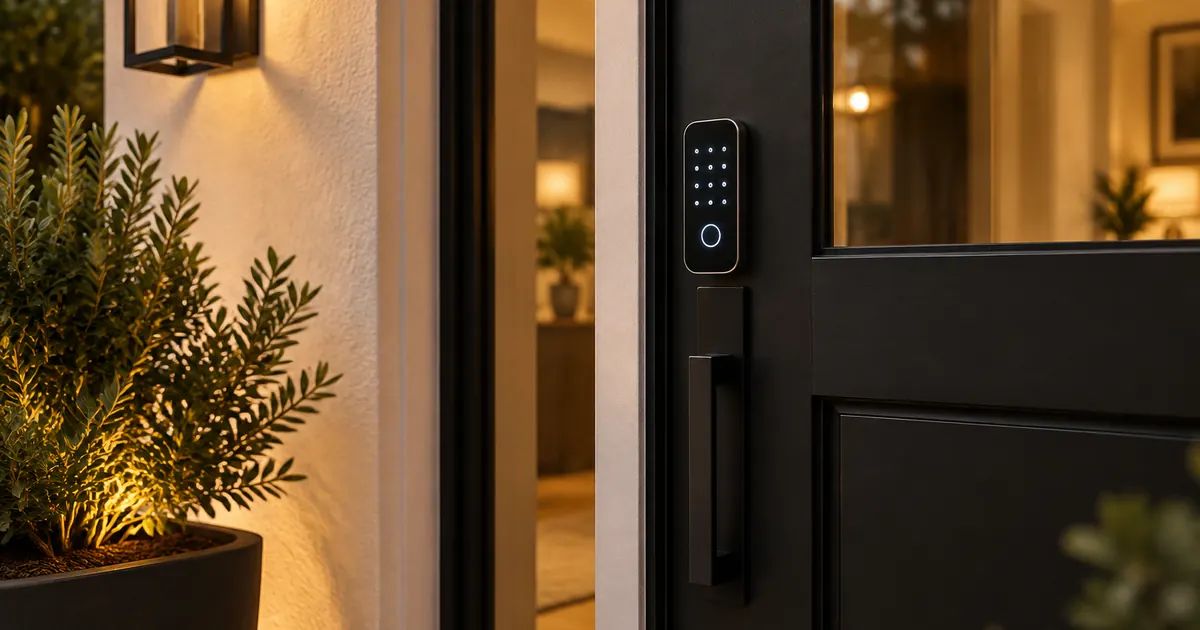
The smart lock is the one device almost nobody removes. The friction it removes is universal: keys. Our fingerprint smart lock handles the three cases that matter — your finger (no phone needed), a keypad code for the kids and the dog-walker, and app access for the one-time entry when a delivery needs to go inside. Installation replaces the existing deadbolt in about twenty minutes with a screwdriver; no wiring, no electrician.
Two buying notes: confirm the backset (2-3/8 or 2-3/4 inch — same measurement as any lock, explained in our door hardware guide), and check the battery claim. Ours runs about a year on four AA batteries, with a low-battery warning weeks before it matters and a physical key override for the day you ignore it.
The Quiet Winner: Smart Fans
A ceiling fan is the fixture you adjust most and think about least — which makes it a perfect automation candidate. The 52-inch smart ceiling fan schedules itself around the household: off at 9am when everyone leaves, on at 5pm in summer before anyone gets home. The genuinely smart part is the scheduling, not the voice control. And the motor matters more than the electronics — a DC motor runs whisper-quiet, which is why the fan gets kept even by people who never touch the app.
Worth It With Conditions: Smart Lighting
Smart lighting is worth automating in exactly two places: outdoor lights (the motion-sensor lantern needs no app at all — motion is the smart part) and the one or two fixtures that should never be left on. Everything else is fine on a wall switch. The dimmable LED fixtures in our lighting collection work with standard dimmers, which keeps the smart decision separate from the lighting decision.
Still Better Dumb: Almost Everything Else
A faucet you can voice-control is a party trick. A pull-down faucet with a ceramic valve is a tool that works for twenty years. Hardware fails in mechanical ways — washers, valves, hinges — and the smart layer does nothing for any of them. Spend on the mechanics first; the electronics are the last 10% of the value.
The Reliability Test
Before buying any smart device, ask: what happens when the power or the internet goes out? The smart lock has a key override. The fan works from its wall control. The lantern works on motion alone. Devices that pass this test get installed and forgotten about in the good way — that is what smart hardware should feel like.
The Battery Question, Answered Properly
Every smart device trades a wire for batteries, so battery life is the honest spec to compare. Our smart lock runs about a year on four AAs — and the number that matters more is the warning window: it alerts weeks before dying, and keeps a physical key override for the day you ignore the alert. When comparing any battery device, ask what happens on the day it dies. Devices with mechanical fallbacks get forgiven; devices without them get uninstalled.
Fingerprint Access: Who It Is Actually For
Fingerprint entry sounds like a luxury until you think through the household. Kids who lose keys, grandparents who cannot manage keypad codes, the dog-walker who needs in at 2pm — fingerprint handles all three without a phone, without a code to remember, and without a key to copy. The sensor reads through reasonable dirt and moisture, and enrolling a second finger for each person takes a minute. It is the rare smart feature that works better for the least technical person in the house.
Wi-Fi, Hubs and the Honest Range Question
Smart hardware connects three ways: Wi-Fi (direct to your router, no hub), hubs like Zigbee or Z-Wave (need a bridge device), and Bluetooth (phone must be close). Wi-Fi devices like our smart ceiling fan are the simplest — they join your network like a laptop. The tradeoff is router range: a device at the far end of the house may need a mesh extender. Before installing anything, stand where the device will live and check your phone's Wi-Fi bars. That thirty-second test predicts every connectivity complaint we have ever heard.
Privacy: The Question Worth Asking
A lock that knows your fingerprint is a device worth trusting carefully. The questions that matter: where are fingerprints stored (ours stores them on the lock itself, not a cloud), what happens when the internet fails (the lock keeps working — the app just cannot reach it), and is there a physical override (yes, a key). Devices that keep the sensitive data local and fail into a working mechanical state are the ones that age well in a home.
The Upgrade Path Worth Taking
Start with the lock, live with it a month, then decide about the rest. Households that automate everything at once end up with devices they never use; households that automate the daily frictions — keys, the fan schedule, the outdoor light — end up with three devices they touch daily and no others. Our door hardware collection covers the entry, and the lighting collection handles the fixtures worth scheduling. That is the whole smart home most people actually want.